Nexus Checker
Il validatore di liste IPTV per Windows: scopri in pochi minuti quali canali funzionano davvero, con risoluzione, bitrate e codec, un report di salute della lista e l'esportazione pronta all'uso.
Windows 10/11 · 64-bit · installer ~100 MB · nessuna registrazione
Cos'è Nexus Checker
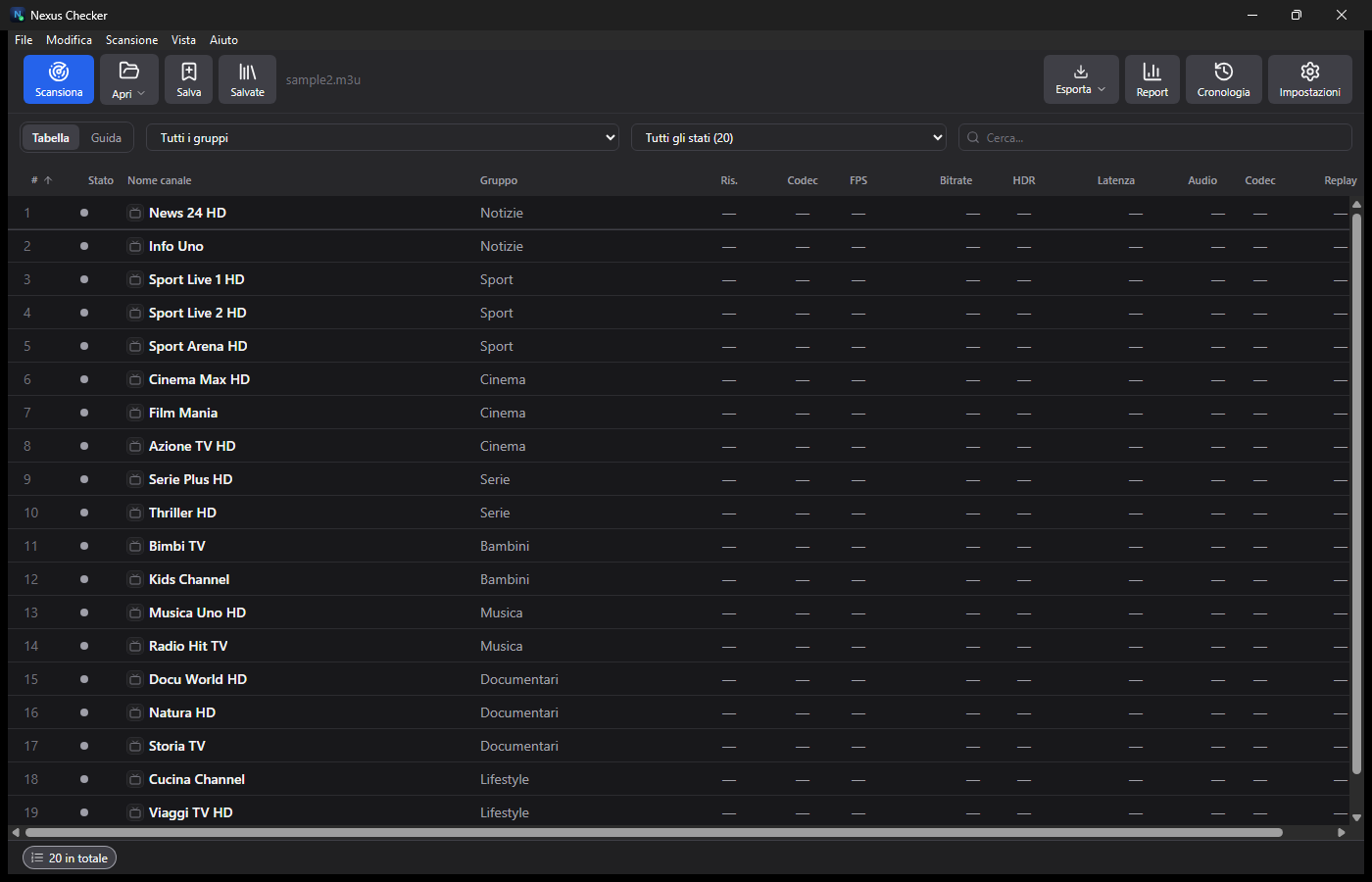
Nexus Checker è un controllo di qualità per le liste IPTV. Carichi una lista M3U (o un file, una cartella, un URL, un server Xtream Codes) e in pochi minuti sai quali canali sono vivi, quali sono morti e con quale qualità trasmettono. Non serve guardare canale per canale: il test gira su più flussi in parallelo e riempie la tabella da solo.
È pensato per chi gestisce liste lunghe: rivenditori, tecnici e appassionati che vogliono una lista pulita, un report da mostrare e file pronti all'uso (CSV, M3U, log JSON).
Funzioni
Test canali
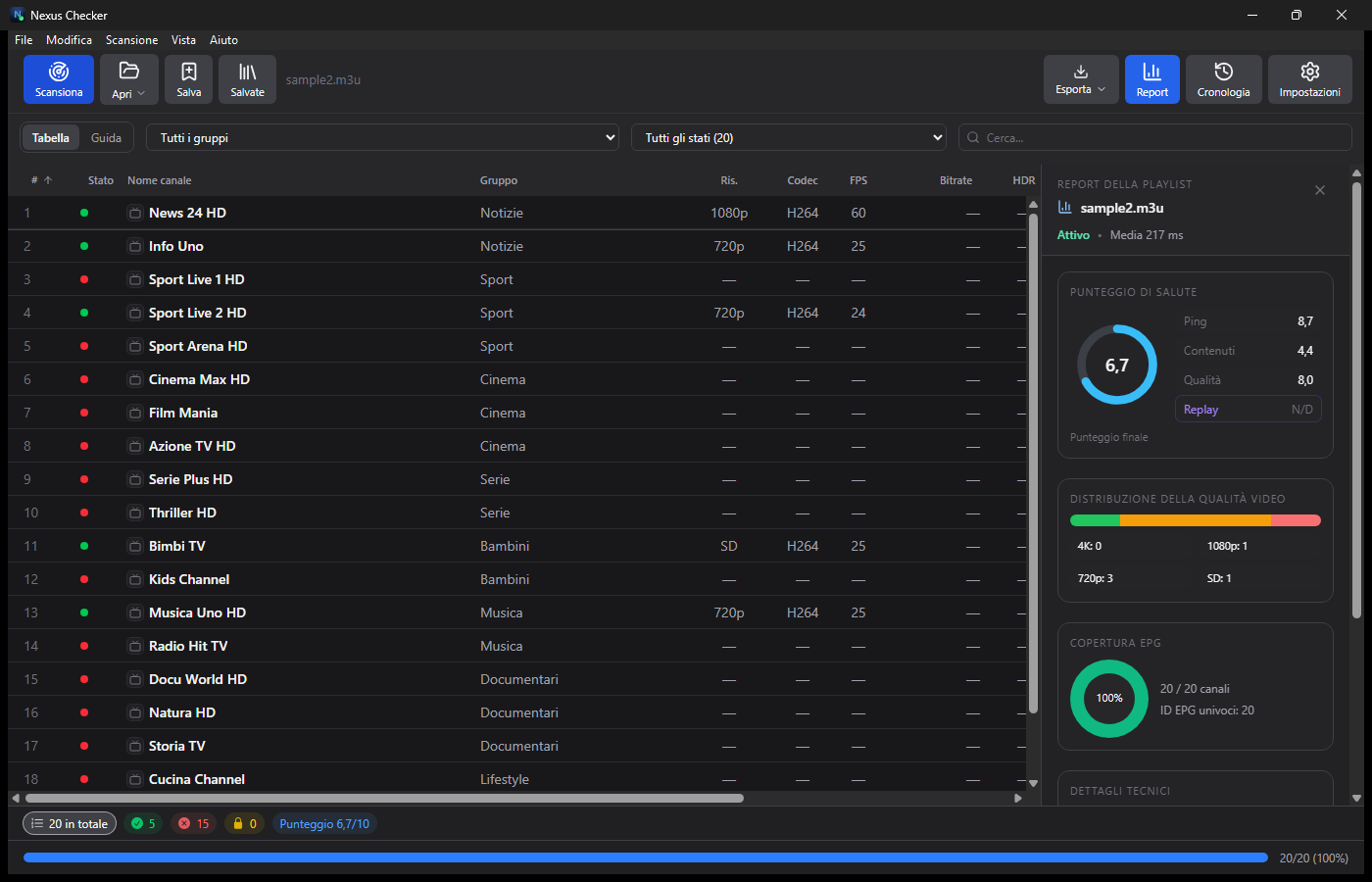
Stato per ogni canale: vivo, morto, blocco geo o DRM, con filtro solo-audio. Esito a colpo d'occhio (verde/rosso).
Qualità reale
Risoluzione, bitrate, codec e FPS letti dal flusso, con avanzamento ed ETA.
Report della lista
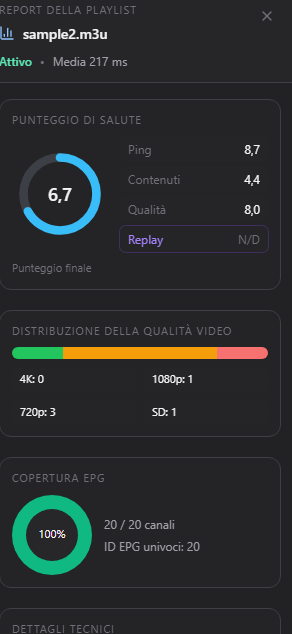
Punteggio di salute (0-10), distribuzione della qualità (4K/1080p/720p/SD) e copertura EPG.
Export CSV · M3U · log JSON
Esporta in CSV; M3U completa, oppure M3U dei soli canali vivi con lo Split; e il log di scansione in JSON.
Guida TV (EPG)
Palinsesto dei canali con ricerca: tocca Guarda per aprire un canale o Scarica per registrare dal catch-up.
Player integrato
Guarda i canali dentro l'app: Play/Pausa, volume, schermo intero, Picture-in-Picture e Chromecast. Col catch-up vai anche indietro nel tempo.
Pulizia e doppioni
Rileva etichette incoerenti (nome e flusso non corrispondenti) e canali duplicati.
Anteprime
Con ffmpeg cattura un fotogramma dei canali vivi e legge i flussi .ts. Si può spegnere per un test solo HTTP/HLS, velocissimo.
Fino a 20 in parallelo
Il test gira su più flussi insieme (fino a 20, regolabili; Auto sceglie il valore giusto). Si può mettere in pausa e riprendere.
Cronologia
Ogni test è confrontato col precedente: vedi i canali peggiorati o recuperati.
Proxy e VPN
Proxy di riproduzione SOCKS5/HTTP per aggirare blocchi ISP o regionali, con suggerimento del Paese e apertura dell'app VPN dal player.
Multi-account
Se l'account Xtream o il portale Stalker è al limite di connessioni, l'app passa da sola a un altro account reale del pool con uno slot libero.
Debug e diagnosi
Log live, badge connessioni, diagnosi degli errori HTTP 401 e Copia diagnostica per l'assistenza.
Come si usa
- Apri Nexus Checker e carica la lista: Apri file, Apri cartella, Aggiungi URL o Aggiungi Xtream.
- Premi Scansiona. Il test parte e la tabella si riempie: stato, risoluzione, codec, bitrate, latenza.
- Apri il pannello Report per il punteggio di salute e la distribuzione della qualità.
- Esporta in CSV, M3U (anche solo canali vivi con Split) o log JSON, oppure usa Guida TV per vedere il palinsesto.
Immagini
Novità in 2.8.7
- Server provider sovraccarico (5xx): su 503/502 l'app prova un'altra variante dello stesso canale invece di fermarsi. I 4xx (credenziali/geo) restano esclusi.
Download
| Voce | Dettaglio |
|---|---|
| Sistema | Windows 10 / 11 · 64-bit |
| Versione | 2.8.7 |
| File | NexusChecker-Setup-2.8.7.exe |
| Dimensione | ~100 MB (include ffmpeg) |
| Prezzo | Gratis |
Domande frequenti
Serve un abbonamento?
No. Nexus Checker è uno strumento: analizza le liste che hai già. Non fornisce né ospita contenuti.
Perché alcuni canali risultano morti?
Il flusso può essere offline, bloccato per Paese (geo) o protetto da DRM. Il test lo segnala con l'esito giusto.
Serve ffmpeg?
È incluso nell'installer. Serve solo per anteprime e flussi .ts/RTSP; senza di esso il test resta HTTP/HLS.
Su Mac o Linux?
Questa build è per Windows. Le versioni per altri sistemi non sono distribuite qui.
Nexus Checker è uno strumento di diagnostica: non fornisce né ospita contenuti. Usa solo liste e fonti di cui hai i diritti.
Nexus Checker
The IPTV playlist validator for Windows: find out in minutes which channels really work, with resolution, bitrate and codec, a playlist health report and ready-to-use exports.
Windows 10/11 · 64-bit · installer ~100 MB · no sign-up
What Nexus Checker is
Nexus Checker is a quality check for IPTV playlists. Load an M3U list (or a file, a folder, a URL, an Xtream Codes server) and within minutes you know which channels are alive, which are dead and at what quality they stream. No need to check channel by channel: the test runs on multiple streams in parallel and fills the table by itself.
It is built for people managing long lists: resellers, technicians and enthusiasts who want a clean list, a report to show and ready-to-use files (CSV, M3U, JSON log).
Features
Channel test
Status per channel: alive, dead, geo block or DRM, with an audio-only filter. Result at a glance (green/red).
Real quality
Resolution, bitrate, codec and FPS read from the stream, with progress and ETA.
Playlist report
Health score (0-10), quality distribution (4K/1080p/720p/SD) and EPG coverage.
Export CSV · M3U · JSON log
Export to CSV; a full M3U, or an M3U of live channels only via Split; and the scan log as JSON.
TV guide (EPG)
Channel schedule with search: tap Watch to open a channel or Download to record from catch-up.
Built-in player
Watch channels inside the app: Play/Pause, volume, fullscreen, Picture-in-Picture and Chromecast. With catch-up you can also go back in time.
Cleanup & duplicates
Detects mismatched labels (name and stream that don't match) and duplicate channels.
Thumbnails
With ffmpeg it captures a frame of live channels and reads .ts streams. Can be turned off for a fast HTTP/HLS-only test.
Up to 20 in parallel
The test runs on multiple streams at once (up to 20, adjustable; Auto picks the right value). It can be paused and resumed.
History
Each test is compared with the previous one: see channels that worsened or recovered.
Proxy & VPN
SOCKS5/HTTP playback proxy to bypass ISP or region blocks, with a country hint and a one-click Open VPN from the player.
Multi-account
When an Xtream account or Stalker portal is at its connection limit, the app switches on its own to another real pool account with a free slot.
Debug & diagnostics
Live log, connection badge, HTTP 401 diagnosis and Copy diagnostics for support.
How to use it
- Open Nexus Checker and load the list: Open file, Open folder, Add URL or Add Xtream.
- Press Scan. The test starts and the table fills in: status, resolution, codec, bitrate, latency.
- Open the Report panel for the health score and quality distribution.
- Export to CSV, M3U (live channels only via Split) or a JSON log, or use the TV guide to see the schedule.
Screenshots
What’s new in 2.8.7
- Overloaded provider (5xx): on 503/502 the app tries another variant of the same channel instead of stopping. 4xx (credentials/geo) are still excluded.
Download
| Item | Detail |
|---|---|
| System | Windows 10 / 11 · 64-bit |
| Version | 2.8.7 |
| File | NexusChecker-Setup-2.8.7.exe |
| Size | ~100 MB (includes ffmpeg) |
| Price | Free |
FAQ
Do I need a subscription?
No. Nexus Checker is a tool: it analyses the lists you already have. It does not provide or host any content.
Why are some channels dead?
The stream may be offline, country-blocked (geo) or DRM-protected. The test reports the correct status.
Is ffmpeg required?
It is bundled in the installer. It is only needed for thumbnails and .ts/RTSP streams; without it the test stays HTTP/HLS.
Mac or Linux?
This build is for Windows. Other platforms are not distributed here.
Nexus Checker is a diagnostic tool: it does not provide or host any content. Use only lists and sources you have the rights to.